We did not start this project because we wanted to build infrastructure for the sake of infrastructure. We started it because our SEO team was spending too much time doing the same store work over and over.
Every time the team needed to update a blog post, check a product, adjust SEO metadata, or insert a widget, it meant moving between tools, tabs, and dashboards. None of that was difficult, but it was distracting. It broke flow.
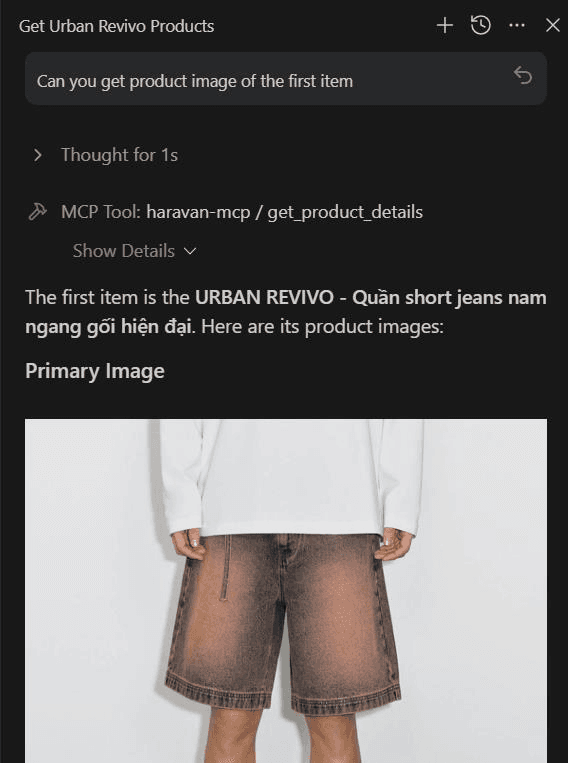
So we asked a simpler question: what if we could just tell an AI assistant what we wanted, and let it talk to Haravan for us?
The Friction We Wanted to Remove#
Anyone who manages content or products at scale knows the pain:
- Updating blog posts one by one.
- Checking product inventory manually.
- Editing SEO metadata across multiple pages.
- Moving between tools just to do repetitive work.
The work itself was not the problem. The repetition was. We did not want another admin panel; we wanted a thin layer that could sit between our team and Haravan, so requests could flow through a single interface and the server could handle the rest.
What We Built#
The server was organized around the parts of the store our SEO team touches most often. The core categories look like this:
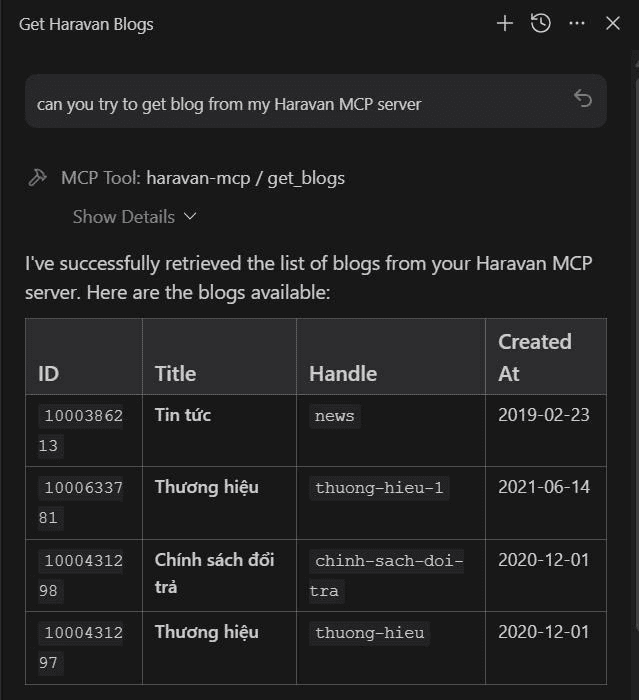
In practice, the server supports a full suite of operations. We also included prompts like write_product_description, generate_blog_post, and suggest_seo_tags. That is where the project stopped feeling like a CRUD wrapper and started feeling like a workflow layer.
The Technical Stack#
We kept the implementation deliberately lean:
- Bun: For runtime and scripts.
- Hono: For Cloudflare Worker routing.
- Cloudflare Workers: For deployment at the edge.
- MCP: As the protocol layer.
- Zod: For input validation and response parsing.
- Native Fetch: Through
HaravanClient(avoiding heavy HTTP libraries).
Why Hono and Cloudflare Workers made sense#
Hono was a good fit because it provided a lightweight worker router that would not fight the MCP implementation.
Cloudflare Workers also made sense because the deployment story is simple, the runtime is close to the edge, the configuration lives cleanly in wrangler.jsonc, and observability stays enabled without extra ceremony.
For a server that mostly proxies API requests and returns structured tool responses, that is the right tradeoff.
Where Haravan fits#
When we talk about Haravan, we think of it as a Vietnam-first commerce platform built around the way local businesses actually sell. On the official Haravan homepage, the platform is positioned around omnichannel selling, websites, social commerce, livestream commerce, and local marketplace integrations like Shopee, Lazada, Tiki, and TikTok Shop.
That matters because the day-to-day problems are different from a generic global storefront. A local team usually cares about Vietnamese customer behavior, local support, local channels, and the operational reality of running both online and offline sales together.
A shorthand comparison is this:
| Platform | How we think about it |
| --- | --- |
| Haravan | A local Vietnam solution for omnichannel commerce, store operations, and content workflows |
| Shopify | A global commerce platform built for broader international scaling and cross-market selling |
Shopify’s own site positions it as a global commerce platform with a strong international footprint. That does not make one better than the other. It just means they solve different kinds of problems well.
For this project, Haravan was the better fit because the team needed to automate store operations for a local market, not build a generic e-commerce layer. The MCP server reflects that choice: it is tuned for the Haravan model, the Haravan API, and the workflows that Vietnamese teams actually need.
How I split the tools#
We did not want one giant tool that tried to do everything. Instead, the domain was split into small tools that map to real tasks. Blog tools handle blog CRUD and categories. Article tools handle article retrieval, updates, SEO, tags, authors, metafields, and related content. Product tools handle search, details, inventory, collections, and top-selling items. SEO tools handle redirects and metadata. Widget tools handle HTML content insertion. System tools provide instance context.
That makes the server easier to explain to an AI assistant and easier to maintain for the team.
The shape of the tools also mirrors how people actually work:
- Find the content
- Inspect the data
- Make a controlled change
- Verify the result
That pattern shows up throughout the README and the use cases file, and the implementation was intentionally aligned with it.
Why validation mattered#
Zod was used everywhere for a reason. When an AI assistant calls tools, bad input is not a rare edge case. It is normal traffic.
Validation protects the server from malformed payloads, missing required fields, incorrect response shapes from the API, and inconsistent inputs from different MCP clients.
So instead of hoping the client behaves, the server validates at the boundary and fails early with clear errors.
Authentication and multi-shop support#
The README mentions a multi-shop approach, and that was important for the team. The core idea is simple: store access tokens securely on the server, keep secrets out of version control, and let the client identify the target shop.
In practice, that means the client sends the shop domain and the server resolves the correct credentials internally.
That is the right tradeoff for an MCP server because the client should not need to know anything about token storage, and sensitive credentials should stay out of configs or prompts.
What I learned while building it#
The biggest lesson was that MCP servers work best when they are opinionated. If you expose too much, the assistant gets noisy. If you expose too little, the server becomes useless.
The sweet spot is a focused capability set with clean boundaries: one tool for one job, explicit validation, predictable response shapes, clear naming, and documented client setup.