In some previous blogs, you can see I am using Claude Code a lot, but I have to admitted it is not the official subscription from Anthropic (Of course I still have to pay). If you browse X, there are many ways that you can use CC with different AI models (Kimi, GLM 4.7, Minimax and somehow CLIProxyAPI where you can route Antigravity, Codex subscription to directly use in Claude Code).
You can question why I do not use their official AI coding agent like Antigravity IDE, Codex CLI but have to work around to get them working in Claude Code. I really like the quote from Daniel Miessler that:
Claude Code is kind of like the Apple Ecosystem from the 2010s.
→ Everyone is fond of it although its highly price compared to whole marker.
Anthropic, as I think, put its priority on building coding tools because they know all the things like automation, AGI and even video making all routed back to coding.
You may think “Video, seriously?”. Yes, in a couple month next, we can see Digital Product company adapting to a more powerful to advertise their product thanks to Remotion with their newly created Skills.
Remotion believes product video can be easily created by React (?Fact check)
You can have a look at some awesome videos make by Remotion here, totally generated by AI with prompts.
Why I switch from Claude Code to OpenCode?#
Anthropic is heading to Monopoly#
Claude Code is wonderful, but …
I GOT BANNED! Yes and it is not their fault, I know that is what I have to paid for when bypass their ToS.
But if you are a big fan of AI Coding agent, you can see Anthropic has several strong actions against other competitors and limited the resource to their own services only as a way to gradually occupying the market:
- Anthropic banned a lot of account violated their TOS including who use Proxy to use Claude Code with different AI model providers, or using Claude Pro/Max subsription in other coding platform like OpenCode, Cline, etc.
Anthropic does not stop there! SWE on X also states that Cursor stop providing Anthropic model for their usage right inside Cursor —> Seems like Anthropic also urge their partners like Cursor to stop providing their direct competitors like X the Claude models.
You may ask “Isn’t Cursor Anthropic’s competitor?”? Not exactly, Cursor provides user the platform for coding, not the one who provides AI models like OpenAI, Google or other big players in China. (Find some reference for this as Cursor is like the distributor of Anthropic)
- Anthropic asks ClawdBot’s founder to rename their products as it has some similar pattern when pronouncing like “Claude” and “Clawd”, especially it got the hype from the community for its powerful use (I am not promoting Moltbot as it still has some seurity concerns and maybe dangerous for non-techie users). Ridiculous, right? But later, it is rebranded into Moltbot and continues its usual operation.
- The invention of Claude Cowork gives many people question that Claude gives partner Claude SDK and API to develop the product, but then they crashed them with the power of Claude Cowork.
Sooner, people may adapt to Claude model increasingly despite its super high pricing compared to other providers.
For me, I want a more flexible way for my agentic coding where I can experience different models. Every model has its own strength, although Opus 4.5 is the best model for coding. Many people are using OpenAI model (GPT 5.2) for code review or architecture design, Google (Gemini 3 Pro) is exceled at UI and generating mockup review.
In the latest release of Kimi 2.5 Thinking, a test has been conducted on the melting candle to see which model generating the best motion.
You can see Gemini (which is good in design) and Kimi 2.5 Thinking are extraordinary at the first attempt while Opus 4.5 is kind of suck.
OpenCode - Opensource but powerful#
During the initative to find the alternative to Claude Code, I went back to OpenCode, wich I gave a trial a couple of month ago. It is much better now but multiple provider auth supported (Antigravity, Codex, MiniMax, GLM and NOT Claude).
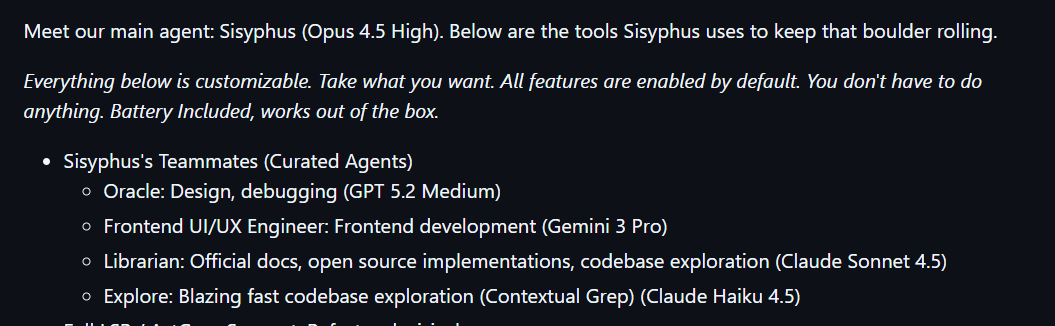
OpenCode, for me, is more powerful with the plugin Oh-My-Opencode plugin. In the first release, Oh-My-Opencode agent naming may remind you of the agents inside Amp — Librarian and Oracle. They are extremely great agents for coding, invented by Amp.
The flexibility of Opencode with Oh-my-opencode plugin#
When switching from a coding agent to another one, it usually requires large migration for your configuration, and I am totally lazy about this.
However, with the Oh-my-opencode plugin, it automatically detects the hooks and skills which I configured for Claude Code before. I have to be Wow, it is so convenient.
The agent team of Oh-My-Opencode#
Vibe Coding or Agentic Coding has gone beyond the scenario that you put in the prompt “Fix this bug for me” and the agent starts to work. Many Coding Agent providers has built many things from simple Plan mode, an Agile workflow for coding agents like BMad Method and recently Gas Town or Ralph Loop which makes your AI Agent works continously, like 24/7.
I have to said, Oh-my-opencode has all of these built-ins. Let’s figure out!
Sisyphus#
Meet Sisyphus, the primary orchestrator agent in OhMyOpenCode. Think of it as your AI project manager - one that actually knows how to code. Unlike simple prompt-and-pray tools, Sisyphus brings discipline, planning, and delegation to your development workflow.
Sisyphus doesn't just execute tasks - it orchestrates them. Here's what sets it apart:
- Smart Delegation: Sisyphus knows when to delegate. It coordinates specialized subagents for different tasks — using the
exploreagent for codebase analysis, thelibrarianfor documentation research, and only handles simple tasks itself. It's like having a senior engineer who knows exactly who to tap for each job. - Meticulous Planning: Before diving into code, Sisyphus breaks down complex tasks into atomic, trackable todos. It marks tasks as in-progress or completed immediately, and updates the plan if scope changes. No more wondering "what's the AI actually doing?"
Prometheus#
Prometheus is a specialized "Autonomous Agent" in the OhMyOpenCode system, designed for continuous, long-running development work. Unlike Sisyphus which focuses on orchestration and delegation, Prometheus works independently and persistently on tasks without constant human oversight.
Key functionalities and when to use Prometheus:
Functionalities:
- Autonomous Operation: Prometheus runs continuously in the background, making progress on tasks even when you're not actively monitoring. It's built for the "set it and forget it" workflow where you want the agent to work 24/7.
- Long-Running Tasks: Ideal for tasks that require extended time and multiple iterations, such as refactoring large codebases, implementing complex features, or running extensive test suites.
When to use Prometheus:
- Background Development: When you want work to continue while you focus on other tasks or are away from your computer.
- Large-Scale Refactoring: For systematic changes across many files that require consistency and patience.
- Exploratory Implementation: When you have a general goal but want the agent to figure out the details and approach independently.
Prometheus embodies the "fire and forget" philosophy, working tirelessly like its mythological namesake who brought fire to humanity and endured endless punishment. It's designed for developers who want to delegate entire features or improvements and come back to completed work.
Sisyphus vs Prometheus: Choosing the Right Agent#
Both agents serve different purposes in the Oh-My-Opencode ecosystem. Here's how they compare:
In practice, many developers use both: Sisyphus for critical features that need careful orchestration and verification, and Prometheus for background improvements, refactoring, and exploratory work that can run autonomously.
My experience when using Prometheus#
I am a big of Prometheus, especially I have multiple AI providers in OpenCode like Github Copilot, OpenAI, MiniMax and there are tons of token to burn.
For the first time I tried Prometheus, it asks me a lot of questions that I have never considered before —> This is simply like an upgrade version of AskUserQuestions tool of Claude Code and OpenCode.
Finally, it generates a very detail plan which last about 3,000 lines. This plan is divided into multi-phases and waves.
“Wave” in Prometheus is defined like tasks and its blocker. It will determine the the tasks that is enough in the context window for agents determine the next waves is blocked or can be executed in parallel. Here is an example:
How is a plan formulated by Prometheus?#
I will take the 3,000 line-plan mentioned above for this example to show how a plan is detailed formulated by Prometheus.
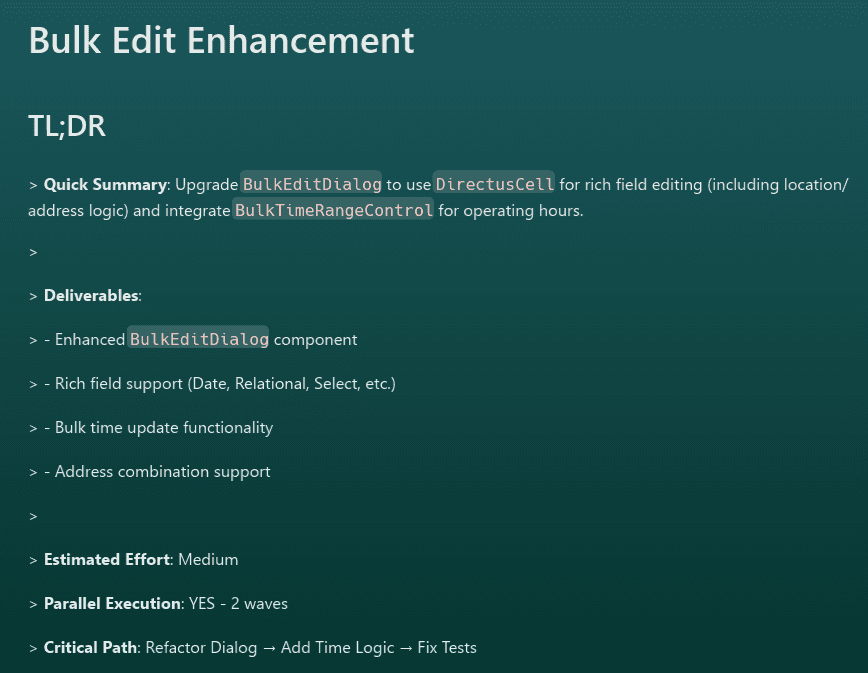
When we ask an AI to "make a plan," we often expect a simple to-do list. However, Prometheus is capable of generating comprehensive engineering documents that rival senior technical leads. Below is an analysis of a real-world feature plan generated by an AI Agent for a "Bulk Edit Enhancement." which is implemented in my data table.
Table of Contents#
- The Executive Hook (TL;DR)
- Context & Strategic Alignment
- Quality Assurance as a First Principle
- Comparison: Generic vs. Agent Planning
- Granular Task execution
The plan begins with a TL;DR section, proving the agent understands that stakeholders have limited time. Instead of burying the lead, it immediately defines the scope, effort, and critical path.
1# Excel-like Cell Selection & Copy/Paste for Data Tables23## Context45### Original Request6Build Excel-like functionality allowing users to select multiple cells (including headers) in data tables and copy/paste data like in Excel.78### Interview Summary9**Key Discussions**:10- Header selection: Ctrl+Click on header = select entire column (plain click = sort, unchanged)11- All keyboard shortcuts enabled (Click, Shift+Click, Ctrl+Click, Ctrl+C, Ctrl+V, Ctrl+A, Arrow+Shift+Arrow)12- Paste enabled: Skip read-only cells, paste valid data with warnings for invalid values13- Unified selection: Cell selection and row selection work together14- Visual: Full Excel style (blue highlight + marching ants border)15- Copy feedback: Visual flash only (no toast)16- Test strategy: TDD with Vitest17- Scope: Collection tables only (saves effort, can extend to other tables later)1819**Research Findings**:20- TanStack Table has NO native cell selection (only row selection)21- Must build custom `useCellSelection` hook22- Pattern: `Set<string>` with `${rowId}-${columnId}` identifiers23- TSV format for Excel-compatible clipboard24- Must be virtualization-safe (access data from table instance, not DOM)2526### Self-Review Gaps Addressed27- **Keyboard focus management**: Need to track focusedCell for arrow navigation28- **Virtualization safety**: Must access data via table.getRowModel(), not DOM29- **Permission integration**: Paste must respect canEditField for each cell30- **Performance**: Use Set<string> for O(1) selection lookup31- **Formula fields**: Skip formula/computed fields during paste
Here is the example of the Executive Hook only! Quite solid right?
The only downsidee of Oh-my-opencode is the heavy token usage. You will not want to use it with API → I would suggest coding plan from Chinese providers like MiniMax, Z.ai or Alibaba is more reasonable.
How to use Oh-my-opencode agents effectively?#
Despite of my explanation above, you may still not have an exact of idea of when to use which agent for your specific use case. So, I catch the comment the creator of Oh-my-opencode on X on how he is using the agents effectively. Very concise explanation!
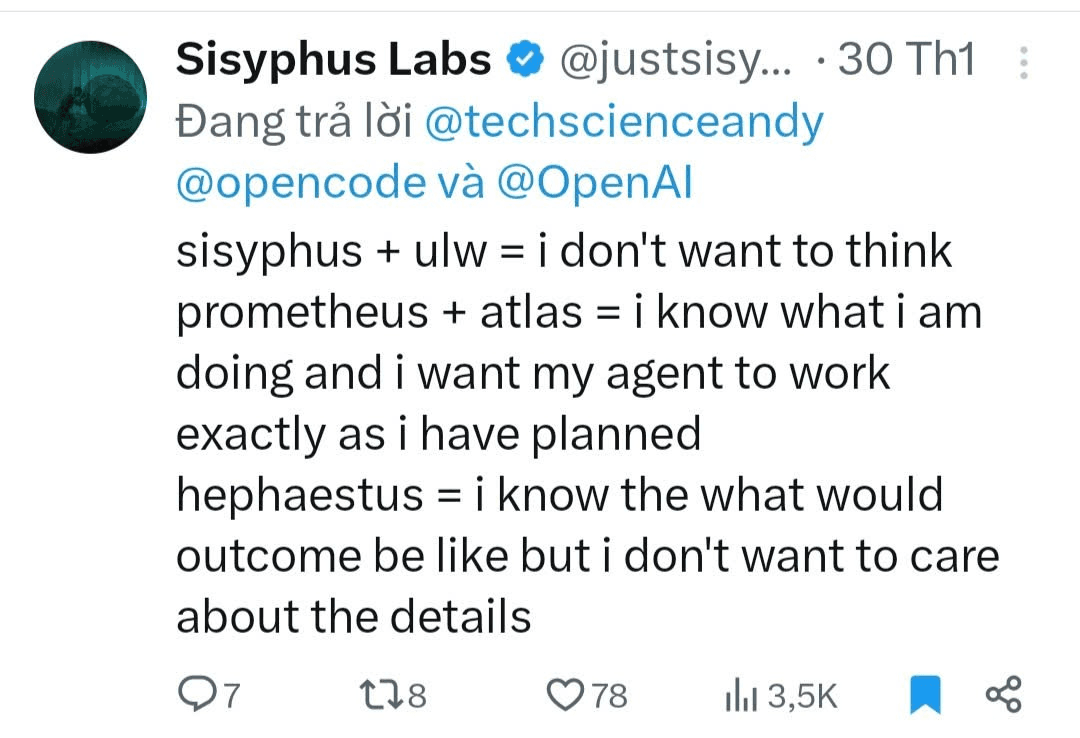
On my lazy mode, I often use Hephaestus so much haha.
My thought#
That’s how I am using Oh-my-opencode for my daily agentic coding (or vibe coding). To be fair, I do not encourage everyone to jump into oh-my-opencode right away, but rather exploring the best coding method for you. Oh-my-opencode is powerful when you are using OpenCode only, while Claude Code also has many great plugins or their own Agent Team is powerful enough (to burn your token).
A way to use, evaluate and improve your agentic coding workflow I really like and apply is from an idea of Daniel Miessler’s post.
Anxiety about 3% better will kill your productivity way more than 3%.
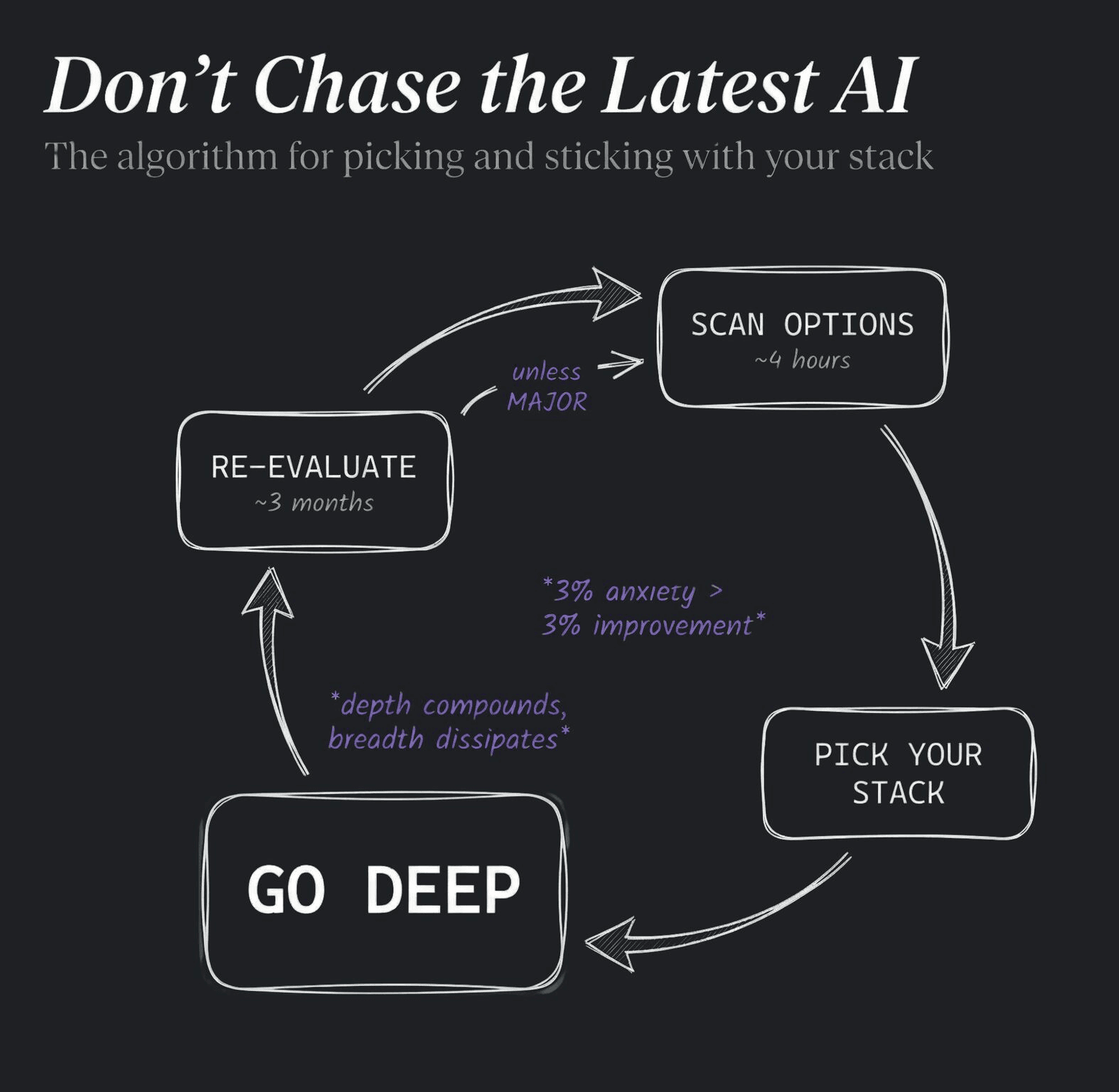
That’s all from mine. Good luck on finding your best stack for agentic coding!